

TL;DR: Managing separate AI subscriptions for ChatGPT, Claude, and Gemini creates “Shadow AI” and security gaps. This guide shows how CTOs can use AICamp to consolidate all LLMs into one secure, governed app, saving 20-35% in costs.
As AI tools flood the market, IT and operations leaders are facing a new challenge: your teams are using AI but not in a way that scales.
Designers use Midjourney. Marketers prefer ChatGPT. Analysts are exploring Claude. Product teams are testing Gemini.
Everyone’s experimenting, but no one’s standardizing. And that’s a problem.
You’ve likely asked yourself:
- “Which AI model should my teams use?”
- “How do I ensure it’s used responsibly?”
- “How do I manage cost and compliance if every team’s doing their own thing?”
Let’s unpack that and look at how platforms like AICamp help you access all AI models in one app while maintaining control, visibility, and governance.
The Hidden Cost of Fragmented AI Usage
What happens when every department uses a different AI tool?
- Marketing uses ChatGPT Pro
- Engineering likes Claude for specs
- Finance tests Gemini for analytics
This leads to:
- Security risks (no centralized governance or audit trail)
- Duplicate spending on multiple AI tools
- Inconsistent outputs across departments
- No visibility into who’s using what, and how effectively
"According to a 2024 McKinsey report, 56% of companies using GenAI tools report "fragmented adoption and inconsistent usage across teams."slowing down enterprise-wide adoption.
If you feel like you’re constantly putting out fires or trying to build standards around AI usage you’re not alone. This isn’t just a tooling issue. It’s a strategic gap in your AI adoption roadmap.
The ROI of a Unified AI Subscription: Why One App Rules Them All
Organizations implementing unified AI platforms typically see concrete financial benefits:
1. Direct Cost Savings:
- Elimination of duplicate subscriptions: Companies report 20-35% reduction in overall AI spending by consolidating individual subscriptions
- Optimized usage tiers: Centralized usage enables better volume discounts and appropriate tier selection
- Reduced administrative overhead: Single billing and vendor management vs. multiple relationships
2.Indirect Benefits:
- Productivity gains: Average time savings of 2.5 hours per week per employee from streamlined tool access
- Compliance efficiency: 60% reduction in time spent on AI usage audits and reporting
- Risk mitigation: Potential savings of $150K-$2M+ from avoided data breaches due to unsecured AI usage
According to Gartner, organizations with centralized AI governance see 40% better ROI on their AI investments compared to those with fragmented approaches.
Not All AI Providers Are Built the Same: Why Choice Matters
Let’s say your marketing team wants GPT for campaign ideas, but your legal team needs Claude for reasoning and context retention. Meanwhile, your product team is exploring Gemini for data tasks.
The truth is:
Each model has strengths but choosing the “best” one depends on the task.
|
|
| |||
|---|---|---|---|---|---|
| OpenAI | ChatGPT models | Versatile writing, coding, chat | |||
| Anthropic | Claude models | Deep reasoning, longer context | |||
| Gemini models | Multimodal inputs, huge context | ||||
| Mistral | Lightweight, fast LLMs | High-performance reasoning with a European-first focus on privacy and 80+ languages.e | |||
| Open Source Models (Llama 3, DeepSeek) | Flexibility & Technical Prowess | Llama 3 is the gold standard for custom fine-tuning; DeepSeek excels in specialized math and coding tasks. |
But here’s the challenge: different teams inside your company will benefit from different providers.
- Engineering want to use Claude’s reasoning.
- Research team may prefer Gemini for multimodal queries.
- Marketing team may lean into GPT for rapid prototyping.
So instead of picking a single provider and limiting your teams, what if you gave your organization access to all leading models from a single, governed workspace?
The AI Platform Approach: Beyond Single-Provider Solutions
While choosing the right AI provider matters, forward-thinking organizations are increasingly adopting unified AI platforms that offer access to multiple models. This approach gives teams flexibility while maintaining governance.
Let’s explore what makes unified platforms valuable for enterprise AI adoption:
- Model diversity: Access to specialized models for different use cases
- Streamlined governance: Centralized controls and permissions
- Cost optimization: Consolidated billing and usage tracking
- Reduced shadow AI: Legitimate paths for teams to access preferred models
AICamp represents one such solution in this emerging category, alongside other platforms like Langodock and Sanalabs.
Let’s examine how these unified platforms help solve the fragmentation challenge.
One Platform. All Providers. Full Control.
AICamp is all in one AI platform, brings together the best AI providers OpenAI, Anthropic, Google, Mistral—under one secure, unified platform.
Your teams no longer have to jump between tools or wonder which model to use. With AICamp, you offer them:
- A single interface to access multiple models
- A shared prompt library to standardize usage
- Group-level permissions to govern access
- Usage analytics to track adoption
- Workflow automation to build custom AI Agents
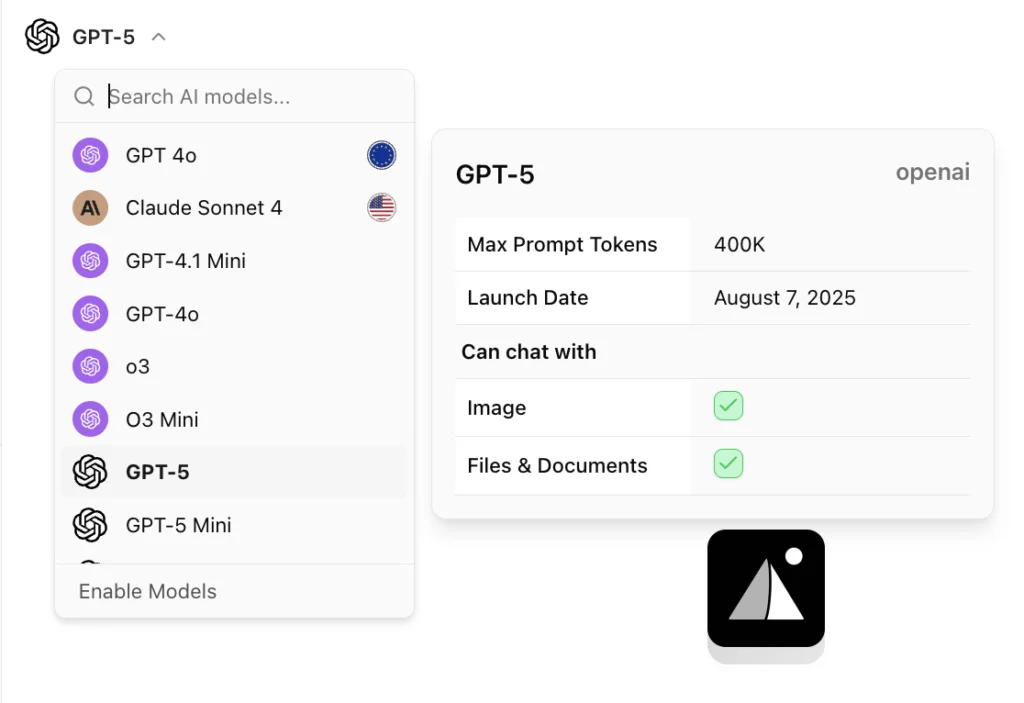
How to Switch Between GPT-4o, Claude 3.5, and Gemini 1.5 in a Single Click
One of the biggest friction points for teams is “tab fatigue” jumping between browser tabs to compare how different models handle the same prompt. In AICamp, we’ve eliminated this by abstracting the model layer.
Whether you need the deep reasoning of Claude 3.5, the multimodal speed of GPT-4o, or the massive context window of Gemini 1.5, you can swap them instantly within the same chat interface.
3 Steps to Toggle Models (Zero Code Required)
Open the Model Switcher: In any active chat window, click the model name dropdown located at the top of the interface.
Select Your Provider: Choose from the list of enabled models (e.g., Anthropic, OpenAI, or Google). AICamp preserves your conversation history and context automatically.
Run Your Prompt: Hit enter. The new model will process your previous context and provide a fresh perspective, allowing for instant side-by-side comparison.
Why Toggling Matters for Your Workflow
Context Comparison: Ask GPT to write code, then toggle to Claude 3.5 to refactor it for better readability.
Cost Control: Use lightweight models (like GPT-4o mini) for basic drafting, then “level up” to a flagship model for final polishing.
No Refactoring: If you are using the AICamp API or Agent Builder, you can change the underlying model of an entire workflow with one click no code changes required.
Two Ways to Deploy AI You Choose
You have two options for deploying AI models inside AICamp:
Managed Model Access
AICamp handles billing, quota management, and access control for top providers. Your teams get started instantly no setup needed.Bring Your Own API Key (BYOK)
Prefer cost control and direct billing? Plug in your own keys for GPT, Claude, or Gemini and still benefit from AICamp’s shared workspace, governance, and analytics.
This dual setup gives you complete flexibility centralize access to all AI models in one application, while retaining control and cost-efficiency.
How Your Teams Can Access and Govern AI Models
AICamp gives IT leaders and admins complete flexibility to manage AI model access based on your organization’s structure. Whether you want to enable AI models for an individual, a department, or across the entire company—AICamp makes it simple and secure.

Role-Based Access with Group-Level Control
With AICamp, you can:
1. Create groups for each department like Marketing, Sales, Legal, Engineering, HR, etc.

2. Enable or disable AI providers (like OpenAI, Anthropic, Google, Mistral) per group based on their use case or security needs.

3. Customize access further by assigning model availability to individual users if needed.

4. Apply global settings to enable a model for the entire workspace when needed.
This allows IT heads and operations managers to scale AI adoption while staying compliant and efficient.
This ensures that:
- Your legal team can safely use Claude.
- Your marketing team gets access to GPT.
- Engineering can run experiments with Gemini or Mistral.
- All usage is tracked, controlled, and auditable.
Above visual shows how admins can structure teams into logical groups and manage AI access with a few clicks.
By organizing access at the group level, you reduce shadow AI usage and ensure responsible deployment of GenAI tools across departments.
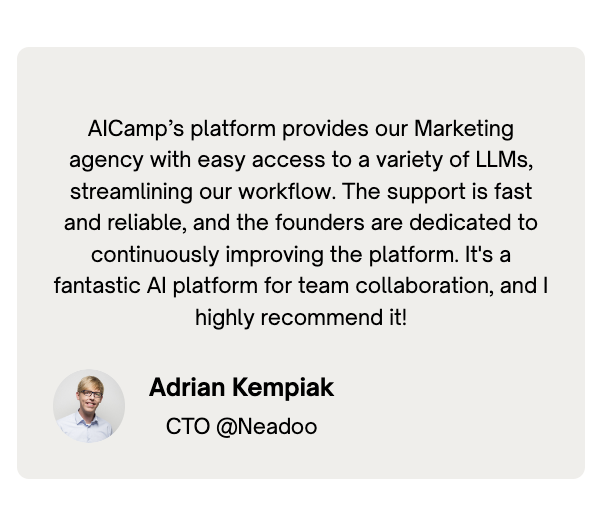
What Our Customers Are Saying
Companies across industries are already benefiting from AICamp:
Why Companies Choose AICamp
- Unified AI access – Use GPT, Claude, Gemini, or Mistral from one application
- Enterprise-ready governance – Role-based access, team usage insights, secure prompt sharing
- Workflow and Co-pilot builder – Build department-specific AI assistants on company data
- AI usage visibility – Know how your teams are using AI, and where it’s driving impact
- Flexible pricing model – Choose managed access or bring your own API keys to cut costs
Transitioning to a Unified AI Platform: A 4-Phase Approach
Organizations typically follow this roadmap when consolidating AI access:
Phase 1: Discovery (2-4 weeks)
– Audit existing AI tool usage across departments
– Document current spending and access patterns
– Identify security and compliance requirements
– Establish success metrics for centralization
Phase 2: Pilot Implementation (4-6 weeks)
– Deploy platform with a limited group (25-50 users)
– Configure initial governance and access controls
– Migrate existing prompts and workflows
– Collect feedback on user experience
Phase 3: Enterprise Rollout (4-8 weeks)
– Expand access to all departments in stages
– Conduct training sessions for different user groups
– Establish formal approval workflows
– Set up monitoring and analytics dashboards
Phase 4: Optimization (Ongoing)
– Review usage patterns and optimize allocated resources
– Refine access policies based on actual usage
– Expand model availability as needs evolve
– Develop internal best practices documentation
This phased approach minimizes disruption while ensuring proper governance from day one.
Industry Perspectives: The Evolving AI Governance Landscape
Expert Insights:
"The organizations seeing the most value from generative AI are those that have implemented structured governance while still giving teams access to best-in-class models for their specific needs." - Sarah Chen, Research Director, Enterprise AI Adoption, Forrester
Regulatory Considerations:
As AI regulation evolves globally, enterprises must balance innovation with compliance:
- EU AI Act requirements for high-risk AI systems
- NIST AI Risk Management Framework guidelines
- Industry-specific regulations (financial services, healthcare, etc.)
Industry Benchmark Data:
- Organizations with unified AI access report 44% higher user satisfaction and 38% better model utilization (IDC AI Adoption Survey, 2024)
- 63% of CIOs list “AI governance and standardization” among their top three priorities (Gartner CIO Agenda, 2024)
A unified platform approach helps organizations adapt to this evolving landscape while maintaining flexibility for different teams.
FAQs
How can I access all AI models in one place?
You can use an AI workspace like AICamp that connects to multiple AI providers (OpenAI, Anthropic, Google, Mistral, and selected open‑source models) in a single interface. Instead of jumping between separate tools, you open one workspace and choose the best model per task while keeping chats, projects, and permissions in one place.Is there an all‑in‑one AI platform for multiple models?
Yes. Platforms like AICamp are built as all‑in‑one AI workspaces where you can access GPT, Claude, Gemini, Mistral, and other models side by side. The platform adds governance, admin controls, and collaboration features so teams can safely use multiple models in one environment instead of managing several disconnected apps.Can I use all major LLMs (GPT, Claude, Gemini, etc.) in one app?
With AICamp, you can use ChatGPT, Claude, Gemini, and selected open‑source models in one app. You simply pick a model for each conversation or project, compare outputs across models, and standardize access for your teams without separate logins or individual subscriptions for every provider.Is there a way to test multiple AI models in one platform?
AICamp lets you test multiple models on the same prompt inside one workspace. This makes it easy to compare quality, speed, and cost before deciding which model to roll out to a team or to use in an internal workflow.Can I get multiple AI models in one subscription instead of paying for each separately?
Yes. AICamp offers multi‑model access under one subscription, so you don’t need to maintain different paid plans for ChatGPT Team, Claude Team, and Gemini. You can also bring your own API keys (BYOK) if you prefer direct billing with OpenAI or Anthropic while still using AICamp as the shared workspace, governance, and analytics layer on top.How do all‑in‑one AI tools compare to using separate AI apps?
All‑in‑one tools like AICamp give you one place for access, permissions, compliance, and analytics across multiple models. Using separate AI apps usually means fragmented billing, inconsistent controls, and scattered chat history, which becomes hard to manage once more than a few people are using AI at work.What’s the best toolkit for unifying different AI model providers under one interface?
For teams, a workspace‑first platform such as AICamp is usually better than simple “multi‑model chat” browser tools. It unifies providers behind one UI, supports groups and roles, and gives admins a single pane of glass for model usage, spend, and data controls, which pure personal tools don’t provide.