


LibreChat has quickly become a favorite for developers and technical teams who want a self‑hosted, open‑source chat UI that can sit in front of multiple LLMs. It gives you flexibility and control without per‑seat SaaS pricing.
But LibreChat also demands engineering time, DevOps effort, and in‑house governance. As more companies move from experiments to real AI rollout, many start looking for alternatives that are easier to manage, more governance‑ready, or better aligned with their existing ecosystems.
TL;DR
In a hurry? Here are the best LibreChat alternatives and what they’re best for:
- AICamp – Best for SMEs that want a managed, multi‑model AI rollout platform
- Microsoft Copilot – Best for Microsoft 365‑centric organizations
- Claude Enterprise – Best for safety‑critical, long‑context enterprise work
- Langdock – Best for EU‑first, workflow‑centric AI workspaces
- Juma – Best for marketing teams and agencies
- Dust – Best for teams that want multi‑model AI agents on company data
- OpenWebUI – Best for local/open‑source LLM enthusiasts
- Perplexity Enterprise – Best for research‑heavy teams
- Amazon Q Business – Best for AWS‑centric organizations
What is LibreChat?
LibreChat is an open‑source, self‑hosted AI platform that provides a chat interface on top of one or more language models. It’s designed to look and feel like a modern AI chat app, while giving you the freedom to connect commercial APIs (like OpenAI, Anthropic) or open‑source/self‑hosted models.
Teams can deploy LibreChat on their own infrastructure, configure multiple backends, and customize authentication, UI, and extensions as needed. This makes it attractive for organizations that want control over data, costs, and model choices without relying on a single SaaS vendor.
Why You Should Look for Alternatives to LibreChat
Even if LibreChat is powerful, it may not be the best fit if:
- You don’t have strong DevOps/engineering capacity. Self‑hosting means you own deployments, scaling, backups, updates, and security hardening.
- You need enterprise governance out of the box. Role‑based access, usage analytics, audit logs, guardrails, and compliance reporting typically require additional work around LibreChat.
- You want deep ecosystem integration. If your world is Microsoft 365, Google Workspace, or AWS, it can be easier to adopt tools that live directly inside those environments.
- You need agents and workflows, not just chat. For complex, multi‑step workflows across tools, agent‑focused platforms may be a better fit.
- You prefer predictable SaaS over infra responsibility. Managed platforms shift effort from engineering time to subscription cost.
Comparison: LibreChat vs Top Alternatives
| Product | Best for | Hosting / Control | Multi‑model? | Governance & Admin | Typical pricing level |
|---|---|---|---|---|---|
| LibreChat | Tech teams wanting self‑hosted, open‑source UI | Self‑hosted, open‑source | Yes (via backends) | Build‑it‑yourself | Software free; infra + APIs |
| AICamp | SMEs rolling AI out across teams | Managed SaaS / dedicated deployments | Yes + BYO | Strong, built‑in | $12/user/month – BYOM $20/user/month – AICamp offered model |
| Microsoft Copilot | Microsoft 365‑centric organizations | Microsoft cloud (SaaS) | Microsoft stack | Microsoft 365 admin | Copilot add‑on per user ($30/user/month) |
| Claude Enterprise | Safety‑critical, long‑context enterprise work | Anthropic cloud (SaaS) | Claude only | Enterprise‑grade | Enterprise contract |
| Langdock | EU/data‑sensitive orgs with workflows | Managed SaaS (EU‑first) | Curated set | Strong, built‑in | $29/user/month- Included $22/user/month – BYOM |
| Juma | Marketing teams and agencies | Managed SaaS | Major vendors | Marketing‑oriented | Custom ( ~$20/user/month – starting) |
| Dust | Product/ops/eng teams building AI agents | Managed SaaS | Curated set | Team/workspace‑level | Pro per user; enterprise tiers |
| OpenWebUI | Local/open‑source LLM enthusiasts | Self‑hosted, open‑source | Yes (local/remote) | Build‑it‑yourself | Software free; infra + APIs |
| Perplexity Enterprise | Research‑heavy, analyst/knowledge teams | Managed SaaS | Under‑the‑hood | Enterprise‑grade | Per‑user enterprise pricing |
| Amazon Q Business | AWS‑centric orgs & engineering teams | AWS cloud | AWS‑focused | IAM‑aware, AWS‑native | Low per‑user + index charges |
1. AICamp
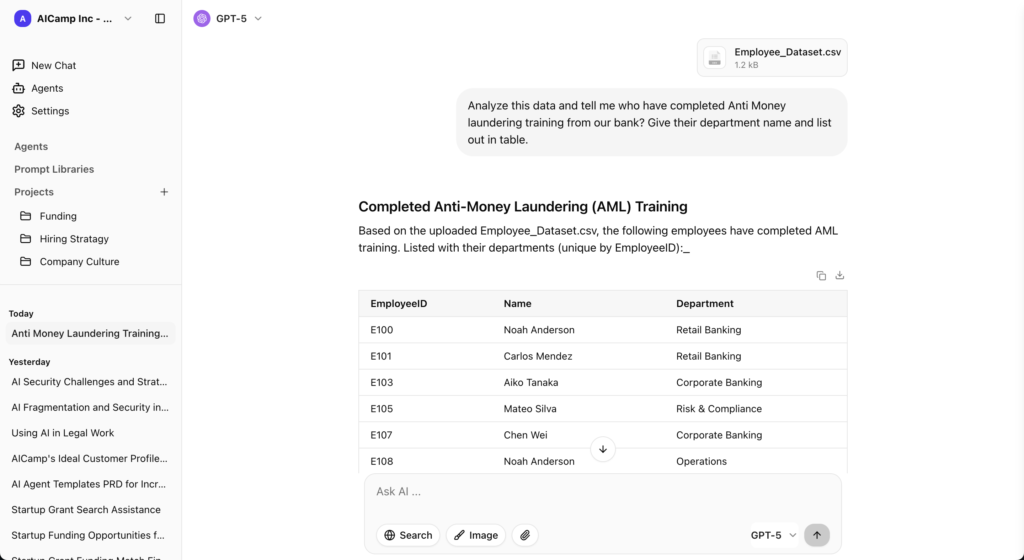
AICamp is a managed AI rollout platform for small and mid‑sized enterprises. It combines chat, projects, agents, and knowledgebases on top of multiple models, with built‑in governance and admin features.
Features
- Multi‑model catalog plus bring‑your‑own APIs/LLMs.
- Chat with memory, multimodel switching, file upload, OCR, data analysis, web search.
- Projects, reusable AI agents, prompt libraries, internal knowledgebases.
- Role‑based access, group model policies, SSO, guardrails, audit logs, admin center, usage analytics.
Advantages
- You get LibreChat‑style flexibility without running your own infra.
- Strong governance and adoption tooling for company‑wide rollout.
Disadvantages
- Subscription cost vs “free” open‑source (though you save engineering time).
- More platform than you need if you’re just two devs playing with models.
Pricing
- Model‑included per‑user plans in the “$20/user/month” range.
- Lower BYOM tier when you pay model providers directly and use AICamp as the governance and workflow layer.( $12/user/month
- Monthly and yearly options.
Best for
SMEs that want multi‑model, governed AI across teams but don’t want to self‑host LibreChat.
2. Microsoft Copilot
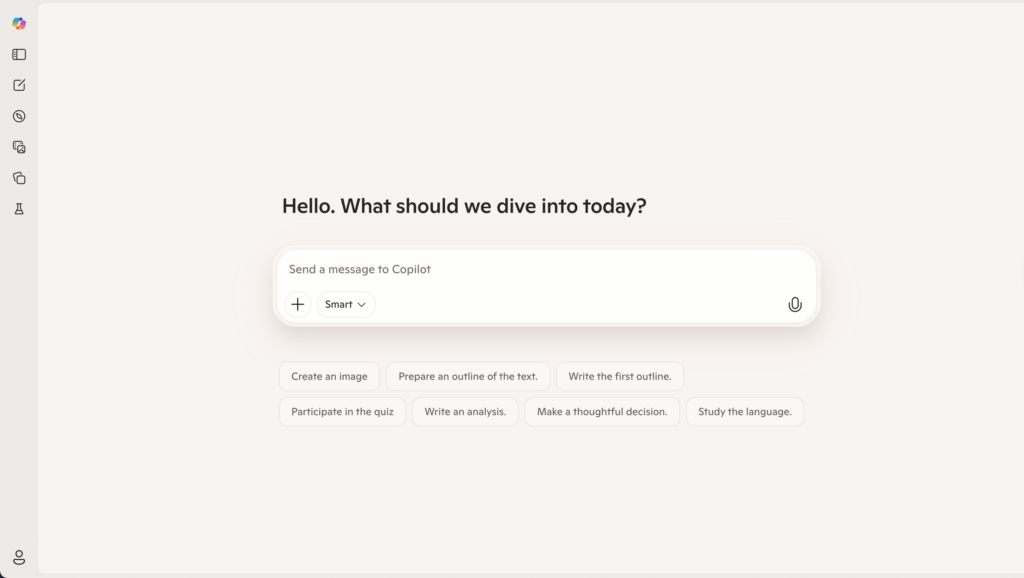
Copilot is Microsoft’s AI assistant embedded into Word, Excel, PowerPoint, Outlook, Teams, and other Microsoft 365 products.
Features
- In‑app drafting, summarization, and rewriting.
- Spreadsheet and data assistance in Excel.
- Slide creation and editing in PowerPoint.
- Meeting summaries and follow‑ups in Teams.
Advantages
- No new app to deploy; lives where users already work.
- Strong security/compliance backed by Microsoft 365.
Disadvantages
- Not a general‑purpose, self‑hosted chat hub like LibreChat.
- Limited model choice; you follow Microsoft’s model roadmap.
Pricing
Licensed as an add‑on per Microsoft 365 user (commonly around the low‑30s USD/user/month).
Best for
Organizations that live in Microsoft 365 and care more about in‑app assistance than self‑hosting.
👉 Also read: Microsoft Copilot Alternative
3. Claude Enterprise
Claude Enterprise is Anthropic’s enterprise edition for teams that want Claude‑based AI with strong safety, long context, and enterprise security.
Features
- Claude models with extended context windows.
- Enterprise security, SSO, admin controls, compliance options.
- Focus on complex reasoning and long‑document handling.
Advantages
- Strong on safety and long documents.
- Managed and supported by a model vendor.
Disadvantages
- Single‑model (Claude only), unlike LibreChat’s multi‑backend design.
- Not self‑hosted; you can’t run it entirely on your own infra.
Pricing
Custom enterprise contracts; typically premium.
Best for
Large, regulated or safety‑sensitive orgs that want Claude as the primary model and a managed solution.
👉 Also read: Claude Team Alternative
4. Langdock
Langdock is an enterprise AI workspace with chat, assistants, agents, and integrations, with strong focus on EU‑centric data residency and governance.
Features
- AI workspace with chat, assistants, agents, and internal search.
- Integrations with collaboration and knowledge tools.
- EU‑first hosting and privacy options.
Advantages
- Strong fit for data‑sensitive, especially European organizations.
- Built‑in workflows and governance, unlike DIY LibreChat setups.
Disadvantages
- More complex and costly than open‑source if you just need a dev playground.
- Closed‑source; less low‑level customization.
Pricing
Per‑seat business plans plus usage‑based components.
Best for
Organizations that want a managed, EU‑friendly AI workspace instead of self‑hosting LibreChat.
👉 Also read: Langdock Alternative
5. Juma
Juma (formerly Team‑GPT) is a collaborative AI workspace focused on marketing teams and agencies rather than general‑purpose engineering usage.
Features
- Shared workspaces for campaigns and marketing content.
- AI‑assisted ideation, copywriting, repurposing, and analysis.
- Integrations with common marketing and content tools.
Advantages
- Far more marketing‑opinionated than LibreChat.
- Helps marketing teams standardize AI workflows without technical setup.
Disadvantages
- Not designed as a general AI platform or self‑hosted solution.
- Limited value for purely technical or non‑marketing teams.
Pricing
Tiered SaaS pricing similar to other marketing platforms.
Best for
Marketing teams who might otherwise try to “hack” LibreChat into a marketing tool.
👉 Also read: Juma AI Alternative
6. Dust
Dust is a platform for designing and running multi‑model AI agents that connect to your existing tools and data.
Features
- Multi‑model support with curated top models.
- Agent builder for multi‑step workflows and tool calls.
- Integrations with Slack, Notion, Google Drive, GitHub, and more.
Advantages
- Strong for agents and workflows, not just chat.
- Managed and supported; no infra to run.
Disadvantages
- Less of a “generic chat UI” drop‑in replacement than LibreChat.
- Requires process design around agents.
Pricing
Pro per‑user plans; higher enterprise tiers via sales.
Best for
Product/ops/engineering teams that want automation and agents, beyond what LibreChat offers out‑of‑the‑box.
👉 Also read: Dust Alternative
7. OpenWebUI
OpenWebUI is an open‑source, self‑hosted web UI for local and remote models, often used with open‑source LLMs on your own hardware.
Features
- Web interface for local and remote LLM backends.
- Works well with self‑hosted/open‑source models.
Advantages
- Similar ethos to LibreChat: open‑source, self‑hosted, multi‑backend.
- Great for experimenting with local models.
Disadvantages
- Enterprise features (RBAC, guardrails, analytics) must be built or added around it.
- Requires engineering time to deploy and maintain.
Pricing
Free software; you pay infra and any external API/model costs.
Best for
Technical teams already running local/open‑source models who like LibreChat’s model but want a different UI/community.
8. Perplexity Enterprise
Perplexity Enterprise is a research‑first conversational search and answer product for organizations.
Features
- Conversational search with citations and links.
- Ability to connect internal knowledge sources in enterprise version.
- Admin and usage controls.
Advantages
- Excellent for research, analysis, and “ask then verify” workflows.
- Designed to reduce hallucination with citation‑backed answers.
Disadvantages
- Not a self‑hosted chat UI or LLM “switchboard” like LibreChat.
- Less oriented to agents or custom pipelines.
Pricing
Enterprise per‑user pricing via sales.
Best for
Research‑first teams that might currently be using LibreChat mainly for “ask and look things up.”
9. Amazon Q Business
Amazon Q Business is AWS’s AI assistant for business users, deeply integrated with AWS and many SaaS systems.
Features
- Connects to AWS and 40+ enterprise data sources.
- Permission‑aware search respecting IAM and app permissions.
- Conversation‑to‑app capabilities (no‑code mini‑apps).
- Visual extraction from PDFs, slides, and docs.
- Works in Slack, Teams, Outlook, Word, browser extensions, and web.
Advantages
- Strong fit for AWS‑centric organizations.
- Built‑in connectors and IAM‑aware search reduce a lot of custom work.
Disadvantages
- Much less compelling outside an AWS‑first environment.
- Pricing includes both user seats and index‑style resource charges.
Pricing
Lite and Pro per‑user tiers, plus separate index‑unit hourly pricing.
Best for
Organizations that run heavily on AWS and want an AWS‑native assistant, not self‑hosted LibreChat.
FAQs
1. What is LibreChat, and why would I look for an alternative?
LibreChat is a self‑hosted, open‑source ChatGPT‑style UI that unifies many AI providers (OpenAI, Anthropic, Google, Azure, Ollama, Groq, Mistral, etc.) into one multi‑user chat interface. It’s great for technical teams that want a customizable, ChatGPT‑like front end, but it is not an opinionated rollout platform with governance, adoption tooling, and non‑technical onboarding for company‑wide AI use.
2. How is AICamp different from LibreChat for enterprise AI rollout?
LibreChat gives you a powerful chat interface and model switcher; AICamp is built as a full AI rollout platform for multiple departments.
- LibreChat focuses on: self‑hosting, multi‑provider chat, plugins, conversation search, and advanced configuration via Docker, proxies, and custom endpoints.
- AICamp focuses on: multi‑team agents, governed knowledgebases, RBAC, audit logs, organizational policies, and “rollout journeys” for non‑technical users and leadership.
- LibreChat suits: infra/engineering‑heavy orgs that want to run their own front end and are ready to manage upgrades, security, and observability themselves.
- AICamp suits: companies that want fast AI adoption across sales, support, ops, product, and leadership with less DevOps overhead and more built‑in governance.
3. What are LibreChat’s strengths and where does AICamp add what LibreChat is missing?
LibreChat is very strong at being a flexible, open‑source ChatGPT replacement:
Strengths of LibreChat:
- Open‑source, self‑hosted control over data and infra.
- Huge list of supported providers (OpenAI, Azure, Anthropic, Google, Vertex, Ollama, Groq, Cohere, Mistral, OpenRouter, DeepSeek, Qwen, etc.).
- Multi‑user auth (email, OAuth2, LDAP), moderation, token‑spend tools, and conversation search.
- RAG/file chat, plugins, prompt presets, agents/MCP support, and a 2026 roadmap including admin panel and dynamic context controls.
Where AICamp adds value:
- Opinionated agents for different departments, not just generic prompts.
- Central governance: RBAC per team, audit trails, and policy controls across all agents and models.
- Rollout tooling: templates, playbooks, and adoption paths for non‑technical teams, which LibreChat intentionally leaves to you to design.
4. Are there other open‑source alternatives to LibreChat—and why still use AICamp?
Yes, there are several other open‑source front ends and agentic tools; AICamp complements them rather than competing at the UI layer.
- Other open‑source fronts: LobeChat and OpenWebUI are popular self‑hosted ChatGPT‑style interfaces; comparisons show LibreChat tends to win on provider breadth and ChatGPT compatibility, while each tool has different UX and deployment trade‑offs.
- Agentic/open‑source stacks: You can pair LibreChat‑style UIs with RAG APIs, vector DBs, and agent frameworks to build advanced assistants, but this requires significant engineering and MLOps.
- Where AICamp fits: You can keep LibreChat (or another OSS UI) for technical experimentation, while AICamp becomes the governed, business‑facing layer where production agents, policies, and cross‑team adoption live.
5. When should I choose AICamp instead of LibreChat for my organization?
Pick AICamp over LibreChat when your main goal is secure, organization‑wide AI adoption, not just running your own ChatGPT clone.
- You want one platform for many teams (sales, CX, marketing, product, finance, ops)—with clear ownership, roles, and access rules per team.
- You care more about governance, compliance, and rollout (RBAC, audit logs, data‑access policies) than about tweaking Docker configs or git pulls yourself.
- You need multi‑model/BYOM plus vendor‑neutral governance, but don’t want to maintain an entire open‑source stack in‑house.
- You want leadership‑ready visibility into usage, impact, and risk something LibreChat’s community tooling doesn’t aim to solve out of the box