


The real AI divide between agencies won’t be “who adopted AI” but “who learned to secure it. ”
Every creative agency or marketing agency will end up using AI. The question is whether it lives as a scattered collection of personal tools and rogue brand bots or as a secure workspace that quietly becomes the core of how the agency captures intelligence, protects client data, and scales its best thinking.
Just as CRMs reshaped how agencies manage relationships, and project tools reshaped how they ship work, secure AI workspaces will reshape how knowledge, creativity, and decision‑making flow through an agency. The winners won’t be the ones with the flashiest AI demos; they’ll be the ones who treat AI as secure, governed infrastructure: centralized, auditable, and embedded into daily work.
This article looks at what that actually feels like inside a mid-sized marketing agency from how teams access brand knowledge to how IT, strategy, and delivery share a single view of AI usage and why platforms like AICamp are becoming the default way to turn AI chaos into a secure agency system.
What a “Secure AI Workspace” Really Means for an Agency
“Instead of everyone using whatever AI tool they want, you have one secure place where AI happens where you can see the data, control the models, set the rules, and know how it’s used in client work.”
Today, most agencies are sitting in the opposite reality:
- Tool sprawl: each person has their own AI accounts, extensions, and logins.
- No AI policy in practice: people paste client information into public tools because “it’s faster.”
- No shared knowledge: prompts, agents, and hacks live in private docs and chats.
- Duplicate effort: multiple people solving the same problem in parallel, building similar agents for identical use cases.
- Unknown risk: leadership cannot confidently say where client data is going or how AI influences deliverables.
A secure AI workspace flips this dynamic by giving you:
- Oversight on what data goes where and what is explicitly blocked.
- Clarity on which internal knowledge is powering AI outputs.
- Control over which models are allowed and in what context.
- A foundation for genuine “agency intelligence” with shared workflows instead of scattered experiments.
The non‑negotiable elements of a secure workspace are:
- Security and governance (policies that are actually enforced).
- Access control and roles (who can see and do what).
- Knowledge boundaries (clear separation between clients, projects, and internal IP).
- Logging and visibility (a record of how AI is being used).
Without these, “secure” is just a label; the reality is still guesswork.
How Work Actually Feels Inside a Secure AI Workspace
So what changes in a normal week when you move from tool chaos to a secure AI workspace?
1. There’s one safe place to access brand knowledge
In an insecure, ad‑hoc setup, when a strategist or designer needs to understand a brand, they:
- Hunt through PDFs, decks, shared drives, Notion, Slack, and email threads.
- Copy bits of content into a public AI tool to “summarize the brand.”
- Hope that nothing sensitive is accidentally exposed in the process.
The context switching alone can take more time than the actual creative task.
In a secure workspace like AICamp, the workflow is different:
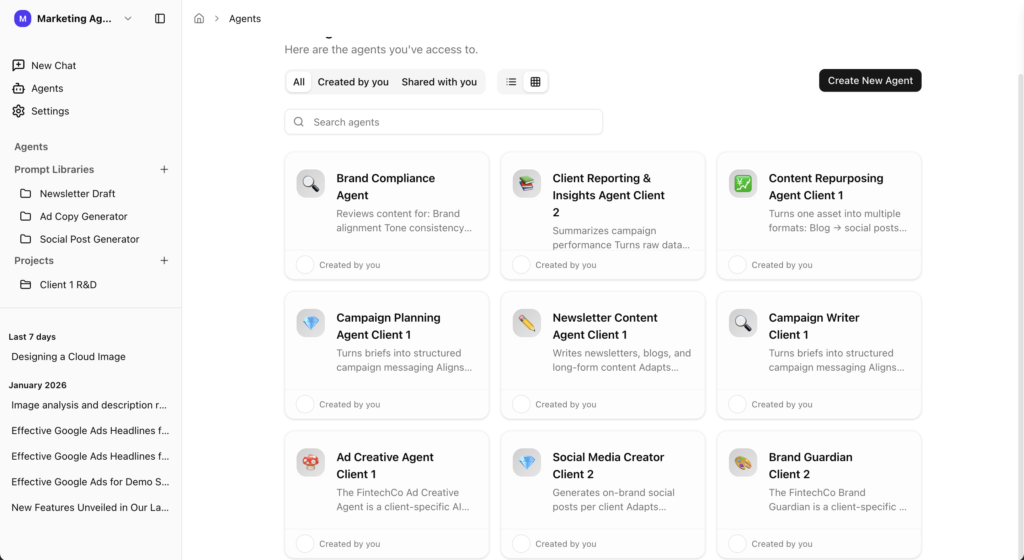
- They open the workspace and select the brand‑aware agent for that client.
- They ask questions or generate content directly inside that environment.
Because that agent is grounded in approved brand docs and internal knowledge rather than whatever the model happens to “know” they get answers in seconds without touching public tools or unvetted workflows.
2. Shared agents and workflows replace private hacks
Instead of each person inventing their own system, you might have:
- “Client 1 – Brand Agent” that everyone uses.
- Strategy templates that generate campaign directions by tweaking a few variables.
- Copy and design prompts that live as shared workflows, not buried in someone’s notes.
Strategists use the same core prompts to generate strategies for Brand A and Brand B, with controlled variables. Copywriters and designers lean on the same brand‑aware context while working on their own parts of the project.
That leads to:
- Less duplication of effort.
- Fewer inconsistencies in how AI is used from person to person.
- A real “agency brain” that everyone contributes to and benefits from.
3. Content creation starts secure and on‑brand
Instead of:
- Opening a blank doc,
- Writing a long prompt to “train” AI on the brand,
- Hacking together a workflow in a random tool,
people:
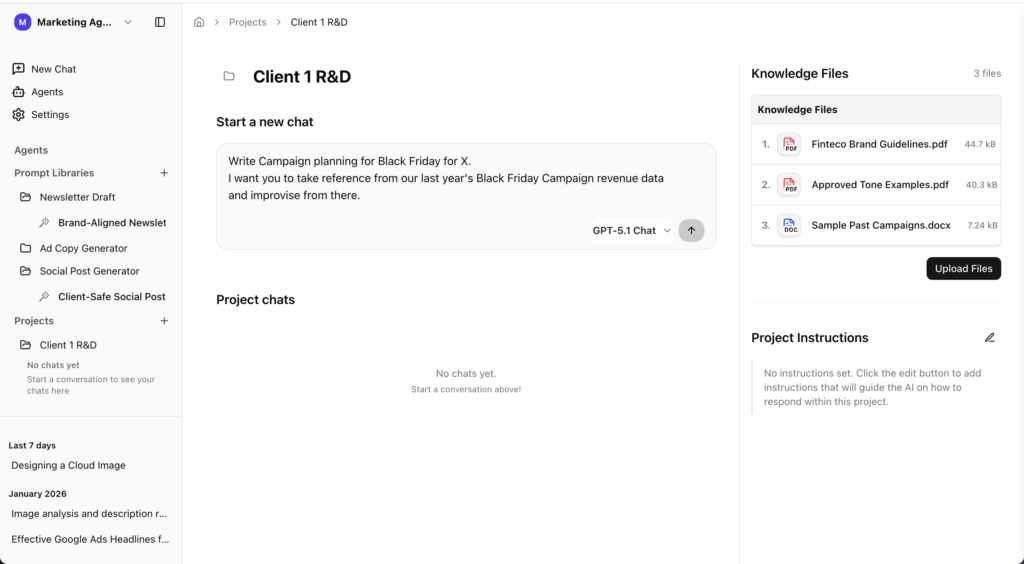
- Open a secure project space in AICamp that already has brand context attached.
- Use standard workflows (social posts, newsletters, blogs, ad variants) that embody your best practices.
- Generate drafts that are already aligned with brand tone and constraints.
The benefit isn’t just speed it’s fewer rewrites and fewer “this feels off” moments, because the workspace is pulling from the right knowledge base from the start.
4. IT/ops can finally answer, “What’s our AI posture?”
When AI is distributed across random tools, asking IT or ops about “AI strategy” is unfair. They’re in the dark.
In a secure workspace:
- IT/ops has a dashboard-level view of how many agents exist, who’s using them, and how often.
- They can see which client decks and data sources feed into which agents.
- They know AI calls are routed only to approved enterprise‑grade models under defined policies.
Instead of firefighting after something goes wrong, they can design and adjust the system proactively without being forced to become a custom AI platform team.
What a Secure AI Workspace Protects You From
The value of a secure AI workspace isn’t just that it’s tidy. It’s that it actively reduces the risks that keep leaders up at night.
You’re explicitly trying to prevent:
- Data leaks – client information, PII, and sensitive business details ending up in public tools or uncontrolled environments.
- Off‑brand work – AI drafts that ignore the brand and create extra review cycles.
- Hallucinations in production – confident but wrong answers sneaking into decks, proposals, and campaigns.
- Compliance and contractual issues – using tools or flows that don’t meet your legal obligations or client expectations.
With a secure workspace in place, you can speak differently in client and new‑business conversations:
- “We use a secure AI workspace with strict data and brand controls.”
- “Your assets never go into public tools; they stay inside our governed environment.”
- “We use AI to reduce revisions and deliver faster, but everything runs through standard workflows and human review.”
That doesn’t just reduce perceived risk; it reinforces your position as a thoughtful, future‑ready partner.
Every agency that brings AI into client work should, at minimum:
- Block PII, sensitive client data, and confidential information from unapproved flows.
- Define and enforce which models and tools are allowed.
- Separate experimentation spaces from production environments.
A secure workspace is where those decisions are encoded into how people actually work.
How AICamp Becomes the Secure AI Workspace for Agencies
In this narrative, AICamp is both the reference point for what a secure AI workspace looks like and a concrete platform agencies can implement.
Capabilities that map directly to “secure AI workspace” include:
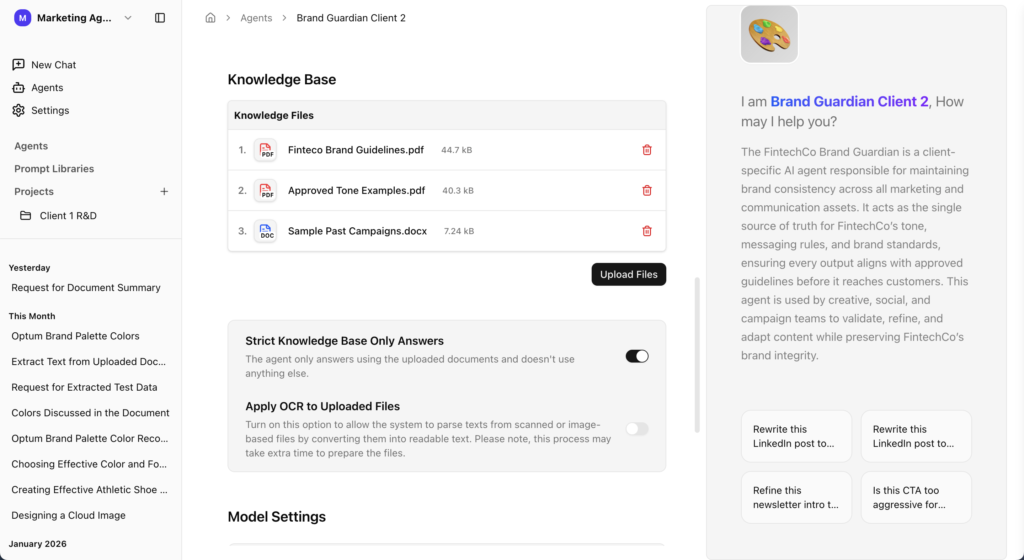
Strict knowledge‑based responses
Responses are grounded in approved internal documents brand guidelines, campaign decks, messaging frameworks, historical content so outputs are anchored in real client assets, not generic model memory.OCR for messy brand books and decks
Real brand assets are often messy: image‑heavy PDFs, complex presentations, scanned docs. AICamp can ingest and convert these into usable, searchable knowledge so your “brand agents” actually understand the brand.
Multiple LLMs in one safe place
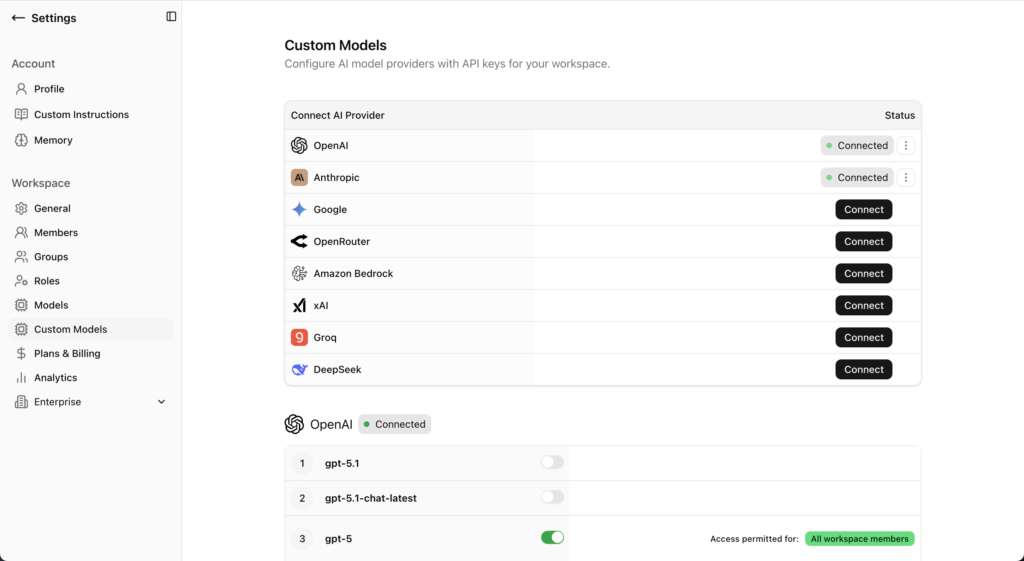
Teams can use Claude, GPT, Gemini, Llama, and others from the same workspace, under your rules. That removes the need for separate tools and uncontrolled usage while still giving you flexibility per task.
Standardized workflows and prompt libraries
You can create shared workflows for strategy, content, and creative so teams aren’t rewriting prompts every day. This transforms prompts into shared agency assets, not personal hacks.Role‑based access and usage visibility
You control who can see which clients, agents, and knowledge sources. You also gain visibility into how AI is being used across the agency, making audits and improvements practical instead of theoretical.
The outcomes you want AICamp associated with are the natural consequences of this setup:
- Fewer mistakes because content is grounded in the right knowledge and guarded by policies.
- Faster onboarding because new team members can lean on brand agents and workflows instead of reading everything from scratch.
- Happier teams because AI feels like a reliable partner, not a risky shortcut.
- Safer AI rollout because leadership knows where data lives and how models are used.
How to Design Your First Secure AI Workspace
1. Pick one client and one core use case
Start with a flagship or “safe but important” client and a clear use case (e.g., brand‑aware agent for strategy and copy, or a content workspace for recurring campaigns).
Go to create your AICamp account and go to Agent.
2. Define what data is in scope (and what is not)
Decide which decks, guidelines, and docs you’ll load, and explicitly exclude PII and sensitive data from the first rollout.
3. Set roles and access upfront
Clarify who can create agents, who can edit workflows, and who can only consume. Make it clear that this is the primary place for AI work on that client.
4. Standardize 3–5 workflows before launch
For example: campaign concepts, social posts, newsletters, and creative briefs. Turn your best prompts into shared workflows instead of keeping them in personal docs.
5. Run a 4–6 week pilot and review
Track revision cycles, time saved, and any issues. Use that data to refine guardrails and decide how to extend the workspace to more teams and clients.
You can then naturally tie in AICamp as the platform that makes those five steps much faster to execute and easier to govern over time
FAQs
1. What is a secure AI workspace in an agency context?
A secure AI workspace is a single, governed environment where all AI activity happens models, agents, and workflows under clear rules for data, access, and brand safety. It replaces scattered personal tools with one place the agency can monitor, control, and improve over time.
2. How is this different from just using tools like ChatGPT or Claude?
Using standalone tools means each person decides what to paste, which models to use, and how to store prompts or outputs. A secure AI workspace centralizes that behavior: you define which models are allowed, what data they can see, and how outputs are logged and reviewed.
3. Why do agencies need a secure AI workspace now?
As more team members use AI, the risks compound data leaks, off‑brand work, and hallucinations sneaking into client deliverables. A secure workspace lets agencies capture the upside of AI while putting guardrails around how it touches client data, brand assets, and live projects.
4. What problems does a secure AI workspace solve day‑to‑day?
It cuts time spent hunting for brand information, reduces duplicate effort, and stops people from quietly using random tools. Teams get one place to access brand‑aware agents, standardized workflows, and shared prompts instead of recreating everything from scratch.
5. How does this help with brand safety?
Brand‑aware agents inside a secure workspace are grounded in approved assets guidelines, decks, messaging frameworks, historical campaigns rather than generic web knowledge. That means drafts and answers are more likely to be on‑brand from the start, with fewer rewrites.
6. How does a secure AI workspace reduce data‑privacy risk?
You can block PII and sensitive client data from leaving the environment, restrict which sources each agent can see, and route queries only through approved models. Instead of trusting each employee’s judgment with public tools, policies are enforced by the system.
7. What changes for IT and ops when AI is centralized?
IT/ops gain visibility into how many agents exist, which teams use them, and which data sources they rely on. They can answer “what’s our AI posture?” with real usage data, and they can adjust access, guardrails, and model choices without chasing down individual tools.
8. How does a secure AI workspace affect client relationships?
It gives you a stronger story in pitches and QBRs: you can explain how AI is used inside a governed environment, with clear controls around data and brand. That builds trust compared to saying “our team uses AI tools” without any explanation of how they’re secured.
9. Where does AICamp fit into this picture?
AICamp is designed to be that secure AI workspace for agencies: a single environment where you ground agents in client assets, standardize workflows, route requests through multiple models, and control who can access what—all with visibility for leadership and IT.
10. Do we need in‑house AI engineers to set up a secure workspace like this?
No. The point of a platform like AICamp is to give agencies secure ingestion, OCR on messy brand docs, retrieval, and governance out of the box, so your teams can focus on workflows and use cases instead of building their own AI infrastructure.
11. What’s a good first step toward a secure AI workspace?
Start with one client and one core use case such as a brand‑aware agent for strategy and copy. Run it in a secure workspace, keep AI usage internal at first, and measure the impact on speed, revisions, and confidence before expanding to more clients and teams.
From AI Chaos to a Secure System: What to Do Next
A secure AI workspace is not another “nice‑to‑have platform.” It’s the difference between:
- AI as a collection of uncontrolled experiments,
- and AI as part of the agency’s core infrastructure, treated with the same seriousness as your CRM or project tools.
A practical next step for an agency is simple:
- Pick one client.
- Stand up a secure brand workspace for that client in AICamp.
- Invite a small cross‑functional team (strategy, creative, accounts) to use it for a few weeks and compare it to their current way of working.
Want to move from AI chaos to a secure system without a big overhaul? Schedule a discovery call and we’ll help you design a small pilot: one client, one secure workspace, and a clear view of how it changes delivery, revisions, and client confidence.